Webhooks
Monek uses Svix to send secure webhook notifications to merchants when important transaction events occur, including sales, refunds, and reversals.
Configure Webhook
To receive webhook notifications you'll need a public HTTP POST URL on your server that can receive and process the webhook JSON payloads.
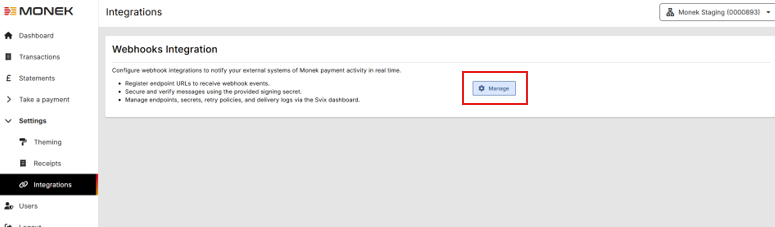
Your webhook URL can be registered via the Monek Portal on the Setting\Integrations page.
Verify your endpoint address before submitting. Monek cannot resend webhooks to previously incorrect addresses. If you register the wrong endpoint URL, transactions that occurred before you correct it will be lost. Test your endpoint thoroughly to ensure it is accessible and correctly configured before registering it.
This functionality is currently in pilot. To enable this option for your merchant please contact Monek Support
Webhook Payload
Each webhook event includes detailed transaction data
| Name | Description |
|---|---|
| Data | The main Webhook node containing transaction details. See Webhook Data. |
| EventId | Unique identifier for this webhook and also the Monek Cross Reference for this transaction. |
| EventType | The type of event this webhook contains. See Event Types. |
| Metadata | Additional information relating to this webhook. |
| Timestamp | The data and time of the transaction represented by this webhook. |
Webhook Data
| Name | Description |
|---|---|
| Amount | The transaction amount minor currency. |
| AuthorisationCode | The authorisation code for a successful transaction. |
| AvsCv2Description | Description of the AVS/CV2 check result. |
| AvsCv2Result | Raw code for the AVS/CV2 result. See AVS/CV2 Response Values. |
| CardType | Card type code. See Card Type Values. |
| CardholderAddress | The cardholder's billing address. |
| CardholderEmail | The cardholder's email address. |
| CardholderName | The cardholder's name. |
| CardholderPhoneNumber | The cardholder's phone number. |
| CountryCode | The merchant's country code. |
| CrossReference | The unique character string returned by TransactDirect to identify this transaction. |
| CurrencyCode | The currency code used for the transaction. |
| IdempotencyToken | The idempotency token specified for this transaction. |
| Last4Digits | The last 4 digits of the payment card. |
| MerchantData | Additional merchant data provided by the merchant. Typically JSON or Base64 encoded. |
| MerchantName | The merchant name. |
| Message | Message indicating the result of this transaction. |
| MessageType | The message type for this transaction. See Message Types. |
| MonekId | The Monek Merchant ID for this merchant. |
| ParentReference | Contains the Cross Reference of the originating transaction. e.g. For completion of Pre-Auth, or Refund or Recharge of a previous transaction. |
| PaymentChannel | Payment channel provided by the merchant for this transaction. |
| PaymentDetail | Additional payment details provided by the merchant. Typically JSON or Base64 encoded. |
| PaymentReference | The ID provided by the merchant to identify the transaction. |
| ResponseCode | The TransactDirect response code. See Response Code Values. |
| ThreeDSecureResult | The 3-D Secure transaction result code. |
| ThreeDSecureVersion | The 3-D Secure version used. |
| TransactionDateTime | The date and time this transaction was processed. |
Webhook Example
{
	"Data": {
		"Amount": "1",
		"AuthorisationCode": "713871",
		"AvsCv2Description": "SECURITY CODE MATCH ONLY",
		"AvsCv2Result": "211100",
		"CardType": "VC",
		"CardholderAddress": "",
		"CardholderEmail": "test@monek.com",
		"CardholderName": "Test Cardholder Name",
		"CardholderPhoneNumber": "",
		"CountryCode": "826",
		"CrossReference": "250613125457713871GD4",
		"CurrencyCode": "826",
		"IdempotencyToken": "177834ab-55f4-4caa-a4f7-3e789d81d9fe",
		"Last4Digits": "0216",
		"MerchantData": "",
		"MerchantName": "Test Account",
		"Message": "AUTH CODE:713871",
		"MessageType": "SALE_CNP_TO[INTERNET]",
		"MonekId": "0000893",
		"ParentReference": "",
		"PaymentChannel": "",
		"PaymentDetail": "Test VT",
		"PaymentReference": "Test VT",
		"ResponseCode": "00",
		"ThreeDSecureResult": "",
		"ThreeDSecureVersion": "",
		"TransactionDateTime": "2025-06-13T12:54:57.36+00:00"
	},
	"EventId": "250613125457713871GD4",
	"EventType": "sale.success",
	"Metadata": {
		"Application": {
			"Name": "Test Account",
			"PayloadRetentionPeriod": 90,
			"Source": "Monek.PaymentService",
			"Uid": "0000893"
		}
	},
	"Timestamp": "2025-06-13T12:54:57.36+00:00"
}
Reliability & Delivery Guarantees
Retry Policy
If a webhook delivery fails, Svix will automatically retry the delivery according to the following schedule:
- Attempt 1: Immediately
- Attempt 2: 5 seconds later
- Attempt 3: 5 minutes later
- Attempt 4: 30 minutes later
- Attempt 5: 2 hours later
- Attempt 6: 5 hours later
- Attempt 7: 10 hours later
- Final attempt: 24 hours later
Retries are sent if the endpoint returns a non-2xx status code or if the request times out (5 second timeout).
Event Ordering
Webhooks for the same transaction are delivered in order, but webhooks for different transactions may arrive out of sequence. Always use the EventId and transaction CrossReference to correlate webhook events correctly.
Latency & Timing Expectations
Webhook Delivery Latency
- Typical latency: Webhooks are delivered within 1-5 seconds of the transaction completing.
- Peak times: During periods of high transaction volume, latency may increase to 10-30 seconds.
- Guaranteed delivery: Monek guarantees eventual delivery (at least once) via the retry policy described above.
When Are Webhooks Sent?
Webhooks are sent immediately after:
- Sales: Transaction authorisation completes (successful or declined)
- Refunds: Refund is processed
- Reversals: Reversal is processed
- Verify: Account verification completes
Webhooks are sent regardless of whether the transaction was successful. Check the `EventType` field to determine the transaction outcome (e.g., `sale.success` vs `sale.decline`).
Monitoring Webhook Health
Regularly check your webhook endpoint health in the Svix Dashboard:
- Log in to your Svix account (accessible from Monek Portal → Settings → Integrations → Webhooks → Manage)
- Navigate to your endpoint to view:
- Delivery success rate
- Recent delivery attempts and their status
- Error messages from failed deliveries
- Set up alerts for failed deliveries to be notified immediately if your endpoint becomes unavailable.
Event Types
Each webhook includes an EventType field which indicates the type of transaction and result of the transaction in the form type.result. For example sale.success would indicate a sale transaction that was successfully authorised.
| Type | Description |
|---|---|
| sale | A sale transaction |
| verify | An account verification transaction |
| refund | A refund transaction |
| reversal | A transaction reversal |
| unknown | An unknown or unsupported transaction type. e.g. When an invalid message type was used |
| Result | Description |
|---|---|
| success | Transaction was successful |
| refer | Transaction was referred for further checks |
| decline | Transaction was declined |
| error | An error occurred processing this transaction |
Handle new or unknown types defensively. For example by logging them for review and implementation.
Verifying Webhook Authenticity
Because of the way webhooks work, attackers can impersonate services by simply sending a fake webhook to an endpoint. This is a potential security hole for many applications.
In order to prevent it, every webhook and its metadata is signed with a unique key for each endpoint. This signature can then be used to verify the webhook is genuine.
There are two options to verify authenticity
Verify Webhooks with Svix Libraries
Details on how to verify webhooks using Svix libraries are available at How to Verify Webhooks with the Svix Libraries
Examples are provided for various languages including C#, PHP, Python, JavaScript, and more.
Manual Verification
Advanced integrations may implement their own HMAC-based signature checking. Learn more about this at Verifying Webhooks Manually.
Secret Key
Your secret key is available via the Svix Dashboard. You can rotate your secret key there at any time.
Source IP Addresses
In case your webhook receiving endpoint is behind a firewall or NAT, you may need to allow traffic from Svix's Static Source IP addresses.
Current IP Addresses (EU Region)
52.215.16.239
54.216.8.72
63.33.109.123
2a05:d028:17:8000::/56